
Honeydew: Recipe Manager
Red HoneyFood & Drink
4.8482.00 Reviews
- Version
- 1.8.0
- Installs
- 100.00K
- Age Rating
- Everyone
Screenshots
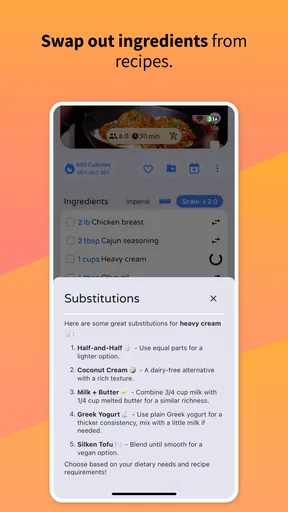
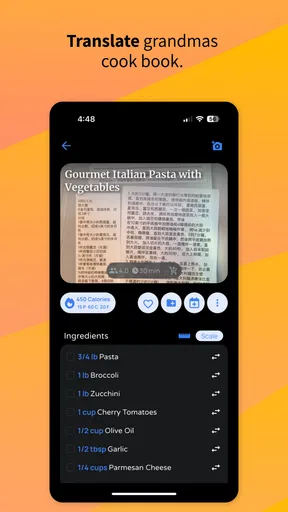

Our Review of Honeydew: Recipe Manager
 Analysis by Appyee
When a recipe clip makes dinner look irresistible, the hard part often comes later: finding it again, working out what to buy, and remembering to cook it before the idea disappears. That is the problem Honeydew: Recipe Manager is meant to tackle. I like the premise because it connects recipe collecting with the week’s actual meals, rather than leaving saved ideas scattered across social feeds and browser tabs.
The first-week appeal: turning inspiration into a plan
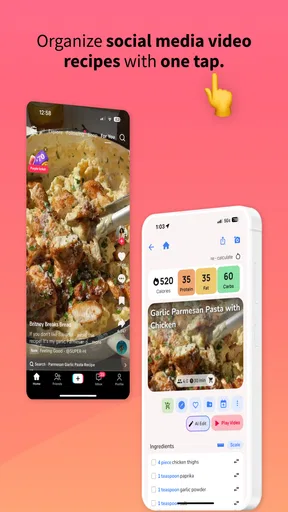
In its first few days, Honeydew is most compelling when you already have recipes you want to keep. Red Honey’s Food & Drink app lets you bring recipes in from websites using a link, as well as enter your own, and it can pull in ingredients and instructions. That makes it easier to turn a recipe you found while browsing into something you can use at home. The app is free to install, has an Everyone age rating, and includes in-app purchases, so I’d check the purchase options before treating every part of it as free.
The key distinction from a basic bookmarks folder is what happens after saving. A bookmark preserves a route back to a page; Honeydew is designed to make the recipe itself part of a collection you can organize, plan around, and shop for. That can be a useful shift if your saved cooking ideas are plentiful but your weeknight decisions still come down to “What can I make with what’s here?”
A realistic weeknight workflow
Picture a Sunday evening when you have a few minutes to plan, but no appetite for building a complicated spreadsheet. You could choose a small number of recipes you genuinely expect to cook, put them into the meal planner, and add their ingredients to the grocery list. Before shopping, I’d scan the combined list against the pantry and remove anything already on hand. That quick check matters: recipe lists are useful starting points, not a substitute for knowing what is already in your kitchen.
At the store, ticking items off can help prevent duplicate purchases, while list syncing is handy when another person is shopping too. I’d agree with that person on who is buying which items, especially if the list is being edited during a busy trip. The benefit is less about sophisticated household inventory and more about giving everyone involved a shared view of the shopping task.
Where it fits among recipe tools
Compared with saving posts in a social app, Honeydew offers a more cooking-oriented place to keep recipes and connect them to planning and groceries. Compared with a paper notebook, it is easier to search and revise without rewriting a page. A general notes app can be more flexible for mixed lists and meal ideas, but it usually asks you to create your own structure and manually maintain the links between a recipe, a plan, and a shopping list.
That structure is the reason I’d choose a dedicated recipe manager, but it is also a trade-off. If you only cook from a handful of familiar dishes, a notes app or a small collection of bookmarks may already be enough. Honeydew makes more sense when you regularly discover recipes, want to retrieve them later, and actually intend to plan meals from them rather than simply accumulate them.
All Your Recipes in One Place
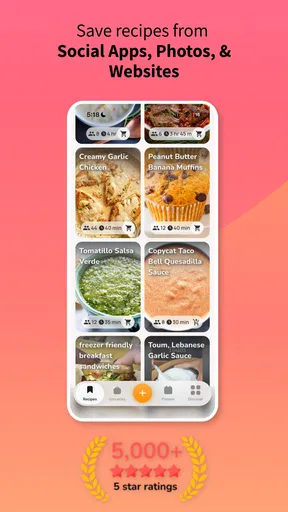
The first thing you notice about Honeydew: Recipe Manager is how intuitively it organizes your recipes. You can add your own recipes manually, or, if you're like me and love trying new things, you can import recipes from your favorite websites with just a link. It’s super convenient—not only does it save the recipe, but it also grabs the ingredients and instructions automatically. No more copy-pasting or jotting things down on sticky notes!
Plus, the app lets you categorize your recipes. Whether you want to sort them by cuisine, meal type, or even cooking time, Honeydew has you covered. It's like having a personal library that’s tailored just for you.
Grocery Shopping Made Easy
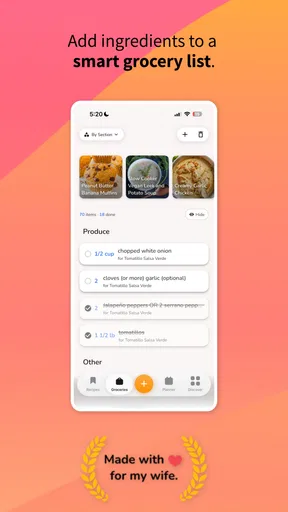
One of my favorite features is the grocery list function. With a tap, you can add all the ingredients from a recipe to your shopping list. I found this especially handy when planning meals for the week. There’s no more “Oops, I forgot the garlic!” moments. The app also lets you tick off items as you shop, which I find quite satisfying.
And the best part? You can sync your list with others! So if you’ve got a partner or a family member who’s also out shopping, they can see what’s already been picked up. It's a small feature, but it makes a big difference.
Cooking with Confidence
Cooking with Honeydew feels like having a sous-chef beside you. The app’s interface is clean and straightforward, making it easy to follow recipes step by step. You can even adjust the serving sizes, and it recalculates the ingredient amounts for you. Perfect for those spontaneous dinner parties or when you’ve got unexpected guests.
Another nifty feature is the built-in timer. No need to switch between apps or worry about overcooking your dish because you lost track of time. Just set the timer within the app, and you’re all set.
Customization and Personal Touch
For those who love a bit of personalization, Honeydew doesn’t disappoint. You can add notes to your recipes, so if you tweak a dish or want to remember a tip, it’s all there. The app also allows photo uploads, so you can snap a picture of your culinary creation. It’s a great way to keep track of how your cooking skills evolve over time.
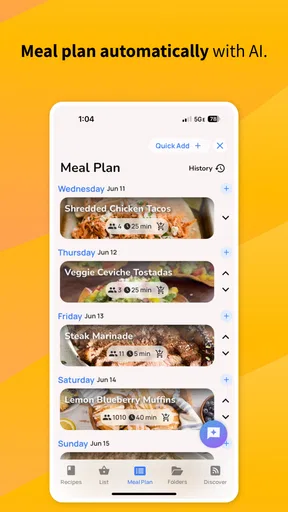
There’s also a meal planner feature that helps you organize your meals for the week. It’s perfect for those of us trying to stick to a budget or a healthy eating plan. You can see what you’re cooking each day and ensure you’re making the most of your ingredients.
Keeping the system useful after the novelty
The app’s lasting value depends less on how many recipes you can collect than on whether you can find the right one when you need it. I’d start with a small, useful set: meals you cook often, a few reliable new finds, and recipes that use ingredients you already buy. Adding every appealing clip immediately may feel productive, but it can turn the collection into another feed to scroll through.
One practical habit is to add a short note after cooking: what you changed, whether the timing worked for your kitchen, and if you would make it again. That makes the notes feature more than a place for occasional comments. It also helps distinguish a recipe that looked good online from one that genuinely fits your household. A photo can serve the same purpose, but I’d treat it as a reminder, not a requirement; the app stays useful even if you do not document every dinner.
Small adjustments that prevent planning friction
Serving-size adjustment is helpful when a recipe needs to feed more or fewer people, but I would still use judgment with seasonings, cooking times, and ingredients that do not scale neatly. A recalculated amount is a convenient starting point, not a guarantee that every dish behaves identically at a different size. For a first attempt, I’d follow the original method closely, then save any changes that worked as a note for next time.
Imported recipes also deserve a quick check before they become part of a plan. Automatic ingredient and instruction capture can save effort, but a fast read-through lets you catch formatting that may be confusing, missing context, or a quantity that looks odd. This is especially worthwhile before shopping: correcting a recipe while planning is easier than discovering a problem midway through cooking.
Who will get the most from it
I can see Honeydew fitting people who find recipes online often, cook at home regularly, and want the same saved idea to support both planning and shopping. It can also help a beginner build confidence by keeping instructions, ingredient amounts, and a timer close together. A household that shares shopping can make use of the synced list, while someone who cooks alone may still appreciate turning several recipes into one more organized shop.
I would skip it if your cooking is mostly spontaneous, you rarely follow written recipes, or you already have a dependable system you enjoy using. It may also feel like extra upkeep if you dislike categorizing, planning, or entering personal recipes. A simple notes file can be a better fit for a few frequently used dishes; a paper list may be quicker for someone who only needs to remember a couple of items. A dedicated manager earns its place when its connected steps save more effort than maintaining them costs.
Month-to-month value and the limits of a meal plan
Meal planning can make a week feel calmer, but it should not become a promise you resent by Wednesday. I’d leave room for leftovers, a change of plans, or a meal that takes less effort than the one originally scheduled. The planner is most useful as a guide to what you meant to cook, not as a strict calendar that makes an ordinary busy evening feel like failure.
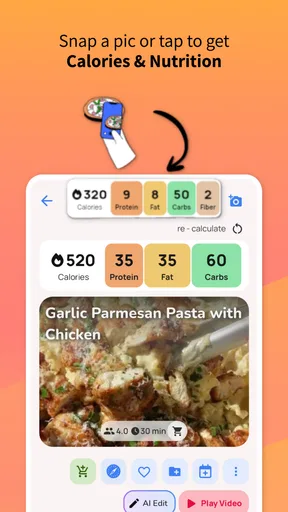
For budget-conscious cooking, the helpful move is to look across the recipes you plan to use and notice overlapping ingredients before shopping. That can make a grocery trip more deliberate, though the app cannot replace your own judgment about quantities, pantry stock, or what is affordable locally. If you are following a particular eating plan, it can organize recipes you have chosen, but you still need to evaluate whether their ingredients and portions meet your needs.
Honeydew has a 4.8 average from around 8,300 ratings, with more than 100,000 installs, and its current version is 1.7.3. Those figures suggest that many people have found a reason to try it, but they do not answer the personal question that matters most: will you return to it when the first burst of recipe-saving enthusiasm wears off? I’d judge that by whether it helps you choose dinner and shop more smoothly, not by how large your recipe collection becomes.
Maintenance, fatigue, and my verdict
The main maintenance burden is the small repeated work around a recipe collection: deciding what to keep, organizing it in a way that makes sense to you, checking imported details, and updating notes when your version changes. None of that is difficult on its own, but it can become annoying if you try to document every meal. I’d keep the system light and save the extra effort for recipes you expect to cook again.
There is also a genuine risk of recipe fatigue. Viral food videos can make every meal look novel, yet a household usually needs dependable dinners more often than it needs a fresh project. If the app becomes a place where attractive ideas pile up without reaching the table, it has reproduced the problem it was meant to solve. I’d balance new discoveries with repeatable favorites and use the planner to make those favorites easier to bring back.
Red Honey’s app is free to download, but in-app purchases range from $0.99 to $199.99 per item. That broad span makes it sensible to review purchase details in the app before committing to anything; the free entry point does not mean every optional purchase will suit every budget. Honeydew runs on Android 7.0 or later, which gives many older devices a path to use it, though anyone on iOS should check compatibility in the relevant app store before installing.
My lasting impression is that Honeydew: Recipe Manager makes the most sense as a practical bridge between finding a recipe and actually cooking it. I like the combination of recipe organization, meal planning, and shared grocery lists, but I would not recommend it simply because you enjoy watching food videos. Give it a try if you want those ideas to become meals and are willing to maintain a modest collection; choose a simpler method if saving and organizing recipes feels like work in itself. That is the difference between a short-lived kitchen novelty and a tool with a place in your routine.
Verdict
Strengths of Honeydew: Recipe Manager
- Intuitive interface for easy navigation.
- Syncs recipes across multiple devices.
- Customizable meal planning features.
- Supports import from various food blogs.
- Offline access to saved recipes.
Limitations of Honeydew: Recipe Manager
- Limited free version features.
- Occasional sync issues reported.
- No barcode scanner for ingredients.
- Lacks integration with fitness apps.
- Ads in the free version can be intrusive.
Similar Picks in This Category
View All
Rappi: Food Delivery, Grocery
Rappi, Inc - Delivery3.5

McDonald’s: Cupons e Delivery
Arcos Dorados4.3

Swiggy: Food Instamart Dineout
Swiggy4.7

Blinkit: Groceries & more
Blinkit4.8

foodpanda: food & groceries
Foodpanda GmbH a subsidiary of Delivery Hero SE4.0

Zomato: Food Delivery & Dining
Zomato4.7
Frequently Asked Questions
What is Honeydew: Recipe Manager and how does it work?
Honeydew: Recipe Manager is a comprehensive app designed to organize and manage your recipes in one convenient location. Users can input their favorite recipes, create shopping lists, and even plan meals for the week. The app also allows for easy categorization and tagging, making it simple to find recipes based on ingredients or dietary preferences.
Can I sync my recipes across multiple devices?
Yes, Honeydew: Recipe Manager offers cloud synchronization, allowing you to access your recipes across multiple devices. This feature ensures that whether you're using a smartphone, tablet, or computer, your recipes and meal plans are always up-to-date and accessible from anywhere.
Does the app support importing recipes from websites?
Honeydew offers a seamless way to import recipes directly from popular cooking websites. With just a few taps, you can extract the essential details, such as ingredients and instructions, and save them in your personal recipe collection, eliminating the need for manual entry.
Is Honeydew: Recipe Manager suitable for users with dietary restrictions?
Absolutely, the app allows users to filter and tag recipes based on various dietary needs such as vegan, gluten-free, or keto. This customization helps users easily find suitable recipes and plan meals according to their specific dietary preferences or restrictions.
Are there any costs associated with using Honeydew: Recipe Manager?
Honeydew offers a free version with basic features, but for advanced functionalities like cloud sync and extensive recipe import options, a premium subscription is available. The premium version also offers an ad-free experience and additional customization options for a more personalized experience.
